Click tray icon with right mouse button, in the opened menu list select "Setting" - you will see a window
In the window, if you see line "License expires" - you use trail version of the program
Note: If you want to purchase the program, press "Buy Now" button, and purchase the program on the pc-cctv program's website
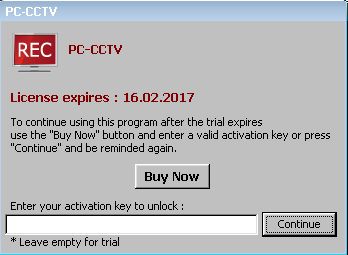
To complete the licensing process - enter the received activation key (you should have received the key after you done purchasing on the website) in the field in the bottom of the window and press "Continue".
Or if you want to continue testing the program - just press the buttion "Continue"